Take Home Exercise 2

Author

Loh Jiahui

Published

May 18, 2023

Modified

June 9, 2023

1 Challenge Overview (VAST Challenge 2023)

Seafood is one of the most widely traded commodities in the global food market. More than a third of the world’s population relies on fish and other seafood as a primary source of protein in their diet, and an estimated 520 million people make their livelihoods through fishing or fishing-related activities.

Unfortunately, illegal, unreported, and unregulated fishing is a major contributor to over fishing worldwide. These activities pose a threat not only to fragile marine ecosystems, but also to food security in coastal communities and regional stability more broadly. The illegal fishing trade has been linked to organized crime, and human rights violations are common when fishing operations are conducted without regulatory oversight.

The country of Oceanus has sought FishEye International’s help in identifying companies possibly engaged in illegal, unreported, and unregulated (IUU) fishing. Using visual analytics, this challenge will sought to help FishEye identify companies that may be engaged in illegal fishing.

1.1 Data

The data used for this exercises will be from Mini Challenge 2 of the VAST Challenge. This includes 2 main files; the first dataset in json format consists of 34,552 nodes and 5,464,092 directed edges, while the second set of files, a bundle of 12, each represent the output of an AI program for link reference Each bundle represents a list of potential edges to add to the main graph. Details of the attributes provided are listed below:

Node:

  • id: Name of the company that originated (or received) the shipment
  • shpcountry: Country the company most often associated with when shipping
  • rcvcountry: Country the company most often associated with when receiving
  • dataset: Always ‘MC2’

Edge:

  • arrivaldate: Date the shipment arrived at port in YYYY-MM-DD format.
  • hscode: Harmonized System code for the shipment. Can be joined with the hscodes table to get additional details.
  • valueofgoods_omu: Customs-declared value of the total shipment, in Oceanus Monetary Units (OMU)
  • volumeteu: The volume of the shipment in ‘Twenty-foot equivalent units’, roughly how many 20-foot standard containers would be required. (Actual number of containers may have been different as there are 20ft and 40ft standard containers and tankers that do not use containers)
  • weightkg: The weight of the shipment in kilograms (if known)
  • dataset: Always ‘MC2’
  • type: Always ‘shipment’ for MC2
  • generated_by: Name of the program that generated the edge. (Only found on ‘bundle’ records.)
Note

For the purpose of this exercise, only the main json file, excluding the bundle files, would be used.

1.2 Objectives

The main objective of this exercise is to use visual analytics to identify temporal patterns for individual entities and between entities in the knowledge graph FishEye created from trade records, and categorize the types of business relationship patterns.

2 Load and Import Data

2.1 Load R Packages

First, the necessary packages are installed and loaded onto the RStudio environment using pacman::p_load().

Show the Code
pacman::p_load(jsonlite, tidygraph, ggraph, visNetwork, tidyverse, igraph, ggraph, lubridate, clock, graphlayouts, viridis, ggdist, colorspace, ggdist, ggthemes, colorspace, scales, cowplot, visNetwork, plotly, stringr, patchwork, viridis, ggstatsplot, kableExtra)

2.2 Importing the data

Unlike earlier exercises where the data files were in csv format, the data files provided for the challenge are in json format. As such, the dataset will be imported using jsonlite::fromJSON and saved as ‘MC2’.

Show the Code
MC2 <- jsonlite::fromJSON("/Users/jiahuiloh/lohjiahui/ISSS608-VAA/Take-Home_Exercises/Take-Home_Ex02/data/mc2_challenge_graph.json")

Next we will convert the file into tibble format using as_tibble(). The nodes’ list will be saved as’MC2_nodes’, andlinks’ list as MC2_edges’. The variables in the lists will also be re-ordered to facilitate subsequent visualisation tasks. The details are as follows:

MC2_nodes: id, shpcountry, rcvcountry

MC2_edges: source, target,arrivaldate, hscode, weightkg, valueofgoods_omu, valueofgoodsusd, volumeteu

Note

For both, the ‘dataset’ column will be dropped since it does not provide any additional information for the purpose of our task.

Show the Code
MC2_nodes <- as_tibble(MC2$nodes) %>%
  select(id,shpcountry,rcvcountry) 

MC2_edges <- as_tibble(MC2$links) %>%
  select(source, target, arrivaldate, hscode, weightkg, valueofgoods_omu, valueofgoodsusd, volumeteu)

3 Data Review and Wrangling

After a quick exploration of the data, a few problems were observed:

  • Variable ‘arrivaldate’ in <chr> format, should be transformed to <date> format
  • Large proportions of missing data, recorded as ‘NA’ or ‘0’ under valueofgoods_omu, valueofgoodsusd and volumeteu.
  • Multiple duplicated rows in the edges list
  • Irrelevant hscodes i.e., not associated with the fishing industry

The following subsections will document the cleaning process.

3.1 Correcting for ‘date’ format

Using the glimpse() function from the dplyr library, we review the columns in the new dataframes.

Show the Code
glimpse(MC2_nodes)
Rows: 34,576
Columns: 3
$ id         <chr> "AquaDelight Inc and Son's", "BaringoAmerica Marine Ges.m.b…
$ shpcountry <chr> "Polarinda", NA, "Oceanus", NA, "Oceanus", "Kondanovia", NA…
$ rcvcountry <chr> "Oceanus", NA, "Oceanus", NA, "Oceanus", "Utoporiana", NA, …
Show the Code
glimpse(MC2_edges)
Rows: 5,464,378
Columns: 8
$ source           <chr> "AquaDelight Inc and Son's", "AquaDelight Inc and Son…
$ target           <chr> "BaringoAmerica Marine Ges.m.b.H.", "BaringoAmerica M…
$ arrivaldate      <chr> "2034-02-12", "2034-03-13", "2028-02-07", "2028-02-23…
$ hscode           <chr> "630630", "630630", "470710", "470710", "470710", "47…
$ weightkg         <int> 4780, 6125, 10855, 11250, 11165, 11290, 9000, 19490, …
$ valueofgoods_omu <dbl> 141015, 141015, NA, NA, NA, NA, NA, NA, NA, NA, NA, N…
$ valueofgoodsusd  <dbl> NA, NA, NA, NA, NA, NA, 87110, 188140, NA, 221110, 58…
$ volumeteu        <dbl> 0, 0, 0, 0, 0, 0, 0, 0, 0, 0, 0, 0, 0, 0, 0, 0, 0, 0,…
Warning

The output report of ‘MC2_edges’ above reveals that the ‘arrivaldate’ is treated as ‘Character’ data type instead of date data type. This is an error! Before we continue, it is important for us to change the data type of ‘arrivaldate’ field back to ‘Date’ data type.

To correct the data type for ‘arrivaldate’ we will use the as.Date() function of lubridate package.

Additionally, we will create 3 new columns to extract the year month, year and month data from ‘arrivaldate’. Doing so will allow us to look at broader and seasonal patterns, if any, in subsequent analyses.

Show the Code
MC2_edges <- MC2_edges %>%
  mutate(arrivaldate = as.Date(arrivaldate),
         yearmonth = format(arrivaldate, "%Y-%m"),
         year = year(arrivaldate),
         month = factor(month.abb[month(arrivaldate)], levels = month.abb, ordered = TRUE))

# Convert yearmonth to date format
MC2_edges$yearmonth <- as.Date(paste0(MC2_edges$yearmonth, "-01"))
Tip

Unlike the ‘year’ or ‘yearmonth’ variable, we see that the codes to extract the month variable was slightly more complicated. Let’s break it down:

  • Using factor() helps use create a factor variable using the abbreviations of the month
  • The levels argument specifies the possible values of the factor, which are the month abbreviations stored in month.abb.
  • Lastly, the ordered = TRUE argument indicates that the factor levels should be treated as ordered or sequential.

3.2 Completeness of data provided

To assess which variables may be most useful for analysis, we use the summarise_all() function to review each variable to understand how complete the data provided is.

MC2_node:

  • There were 0 missing values in the ID column.
  • More than half of the rows in ‘shpcountry’ were recorded as NA. Should we decide to use this data column, it should be used with caution.
Show the Code
MC2_nodes %>%
  summarise_all(~ sum(is.na(.)) / n())
# A tibble: 1 × 3
     id shpcountry rcvcountry
  <dbl>      <dbl>      <dbl>
1     0      0.647     0.0841

MC2_edges:

  • Looking at the two variables indicating value of goods in both omu and usd, a high proportion of NA was recorded.
  • Approximately 84% of records in the ‘volumeteu’ column were recorded as 0, and may not be very useful for analyses.
  • No missing values, however, was noted for the weightkg column. It may therefore be more efficient to use this column for analyses.
Warning

When eyeballing the data, the ‘volumeteu’ column appeared to have a lot of ‘0’ value. As such, to calculate the proportion of ‘0’, we use the summarise() and mean() function.

Show the Code
MC2_edges %>%
  summarise_all(~ sum(is.na(.)) / n())
# A tibble: 1 × 11
  source target arrivaldate hscode weightkg valueofgoods_omu valueofgoodsusd
   <dbl>  <dbl>       <dbl>  <dbl>    <dbl>            <dbl>           <dbl>
1      0      0           0      0        0             1.00           0.552
# ℹ 4 more variables: volumeteu <dbl>, yearmonth <dbl>, year <dbl>, month <dbl>
Show the Code
MC2_edges %>%
  summarise(zero_proportion = mean(volumeteu == 0, na.rm = TRUE))
# A tibble: 1 × 1
  zero_proportion
            <dbl>
1           0.842
Note

With this summary in mind, subsequent analyses would focus on using the weight of shipments to understand trade relationships between companies.

3.3 Checking for duplicates

As both datasets are relatively large. We will also check for duplicates in both dataframes using the distinct() function from dplyr.

MC2_nodes: no duplicated rows were found.

MC2_edges: 155,291 duplicated rows were identified

Show the Code
#Nodes
# Remove duplicated rows and keep only unique rows
MC2_nodes_unique <- distinct(MC2_nodes)

# Calculate number of removed duplicated rows
num_removed_rows <- nrow(MC2_nodes) - nrow(MC2_nodes_unique)

# Print the number of duplicated rows
cat("Number of duplicated rows in MC2_nodes:", num_removed_rows, "\n")
Number of duplicated rows in MC2_nodes: 0 
Show the Code
#Edges
# Remove duplicated rows and keep only unique rows
MC2_edges_unique <- distinct(MC2_edges)

# Calculate number of removed duplicated rows
num_removed_rows <- nrow(MC2_edges) - nrow(MC2_edges_unique)

# Print the number of duplicated rows
cat("Number of duplicated rows in MC2_edges:", num_removed_rows)
Number of duplicated rows in MC2_edges: 155291
Note

While it is possible to have multiple identical shipments between companies, it does seem odd that everything is identical down to the weight of the load. As such, we will assume these rows to be errors in the data and remove them from subsequent analyses.

A new dataframe with only the unique shipments, will be saved under ‘MC2_edges_unique’.

3.4 Reviewing list of HS Codes

Reviewing the list of hscodes, we note that there are 4,761 unique codes. It is unclear however, if all codes are related to the fishing industry.

Show the Code
# Calculate the number of unique hscode values
num_unique_hscode <- MC2_edges_unique %>%
  distinct(hscode) %>%
  n_distinct()

# Print the number of unique hscode values
cat("Number of unique hscode values in MC2_edges_unique:", num_unique_hscode, "\n")
Number of unique hscode values in MC2_edges_unique: 4761 

To further explore this, hscodes were compared with to key sources:

  • The Singapore Trade Classification, Customs and Excise Duties document.

  • HSN Code List from here.

Note

Singapore adopts the 8-digit HS Codes in the ASEAN Harmonised Tariff Nomenclature (AHTN), which is based on the WCO 6-digit level HS Codes. We will be using the first 6 digits to match with codes in our dataset.

Using both HS code documents as a guide, the following categories were found to be relevant to our area of interest:

No. Categories Corresponding Codes
1 Chapter 3: Fish and crustaceans, molluscs and other aquatic invertebrates. 0301, 302, 303, 304, 305, 306, 307, 308
2 Chapter 15: Animal, vegetable or microbial fats and oils and their cleavage products 1504
3 Chapter 16: Preparations of meat, of fish, crustaceans, molluscs or other aquatic 73 invertebrates, or of insects. 1603, 1604, 1605
4 Chapter 21: Flours, meals and pellets, of meat or meat offal, of fish or of crustaceans, molluscs or other aquatic invertebrates, unfit for human consumption; greaves 2301

We will extract shipments that match the first 3 or 4 digits from the table above.This narrows down the number of relevant links to 752,784.

Show the Code
desired_hscodes <- c("301", "302", "303", "304", "305", "306", "307", "308", "309", "1504", "1603", "1604", "1605", "2301")

MC2_edges_fishing <- MC2_edges_unique %>%
  filter(str_detect(hscode, paste0("^(", paste(desired_hscodes, collapse = "|"), ")")))
Note

In this code, the following functions are used:

  • str_detect() to check if the “hscode” value starts with any of the codes in the “desired_hscodes” list.

  • paste0() function to concatenate the desired codes with the | character to create a regular expression pattern. The pattern ^( and ) ensure that the match occurs at the beginning of the string.

3.5 Wrangling attributes

A close examination of the ’MC2_edges_fishing’ dataframe reveals that each row of data consists of individual transactions. This is not very useful for visualisation.

In view of this, we will aggregate the rows by source, target and year month. To do so, we will use the following 4 functions from dplyr package; filter(), group(), summarise(), and ungroup().

The new dataframe, ‘edges_ym’, will also include of the following variables:

  • weight: Number of shipments between two entities
  • sumweightkg: Total weight of products for all shipments
  • avg_weight_per_shipment: Average weight of products per shipment (sumweightkg/weight)
  • year: Extracted from yearmonth
Note

As the remaining variables such as valueofgoods_omu, volumeteu and valueofgoodsusd recorded a high proportion of ‘NA’ or ‘O’, we will exclude them the new dataframe.

Show the Code
edges_ym <- MC2_edges_fishing %>%
  group_by(source, target, yearmonth) %>%
  summarise(weight = n(), sumweightkg = sum(weightkg), .groups = 'drop') %>%
  filter(source != target) %>%
  filter(weight > 1) %>%
  ungroup() %>%
  mutate(avg_shipmentwt = sumweightkg / weight) %>%
  mutate(year = substr(yearmonth, 1, 4))

# Change variable names
edges_ym <- edges_ym %>%
  rename(from = source, to = target)

Lastly, since a signification proportion of edges were filtered out, we will also create a new nodes list.

If you recall earlier, more than half of the nodes in the original data set indicated their most associated shipping country as ‘NA’. This number has decreased significantly post-cleaning to about 25%. We will replace ‘NA’ with ‘Unknown’.

Show the Code
# Get unique values from 'source' and 'target' columns
unique_outliers <- unique(c(edges_ym$from, edges_ym$to))

# Filter 'MC2_nodes' based on unique values
nodes_ym<- MC2_nodes %>%
  filter(id %in% unique_outliers)

# Check for NA
nodes_ym %>%
  summarise_all(~ sum(is.na(.)) / n())
# A tibble: 1 × 3
     id shpcountry rcvcountry
  <dbl>      <dbl>      <dbl>
1     0      0.243      0.158
Show the Code
# Replace with unknown
nodes_ym <- nodes_ym %>%
  mutate(
    shpcountry = if_else(is.na(shpcountry), "Unknown", shpcountry),
    rcvcountry = if_else(is.na(rcvcountry), "Unknown", rcvcountry)
  )

4 Understanding the data

4.1 Basic Network Measures

With the basic data cleaning completed, we will use tbl_graph() to buid a tidygraph network graph dataframe. Nodes and edges aside, we will also calculate the centrality measures for the network, as it will provide useful insights and guides us to identify important nodes in the network. Specifically, we will calculate:

  • in-degree - The number of in-degree refers to the number of incoming edges that are directed towards that node. For this exercise, nodes with high in-degree could potentially represent big wholesalers in the fishing industry.

  • out-degree - Out-degree of a node refers to the number of outgoing edges that are directed away from that node. In this case, nodes with high out degrees would likely signal big players in the industry.

  • betweenness centrality - This measures of the importance or centrality of a node within a network, as these nodes usually act as a bridge, controlling the flow of goods between nodes.

Show the Code
ym_graph <- tbl_graph(nodes = nodes_ym,
                      edges = edges_ym, 
                      directed = TRUE)

# Calculate in-degree and out-degree
ym_graph <- ym_graph %>%
  mutate(in_degree = degree(., mode = "in"),
         out_degree = degree(., mode = "out"))

# Calculate betweenness centrality
ym_graph <- ym_graph %>%
  mutate(betweenness = centrality_betweenness())

A boxplot is then charted to help us better understand the characteristics of the centrality scores that were calculated.

Note

From the boxplot below, the following observations were noted:

  1. Majority of nodes have very low scores across all 3 centrality measures.
  2. A sizable group of outliers were noted recording very high betweenness scores. If you recall, betweenness centrality measures the importance of a nodes within a network, as these nodes generally serves are important bridges between other nodes and control the flow.
  3. In particular, we see 4 nodes with exceptionally high betweennes scores.
Show the Code
# Pull centrality data
centrality_data <- ym_graph %>%
  select(id, in_degree, out_degree, betweenness) %>%
  as_tibble() %>%
  mutate(ID = as.character(id)) %>%
  select(-id) %>%
  pivot_longer(-ID, names_to = "Centrality", values_to = "Score")

# Calculate means
means <- centrality_data %>%
  group_by(Centrality) %>%
  summarise(Mean = mean(Score))

# Create tooltip text
tooltip_text <- centrality_data %>%
  mutate(Tooltip = paste("Centrality:", Centrality, "<br>Score:", Score)) %>%
  select(Centrality, Tooltip) %>%
  unique()

# Visualize the range of scores using a boxplot
plot <- ggplot(centrality_data, aes(x = Centrality, y = Score)) +
  geom_boxplot(fill = "steelblue", color = "black") + 
  geom_point(data = means, aes(y = Mean), color = "red", shape = 18, size = 3) +
  labs(x = "Centrality", y = "Score") +
  theme_classic() +
  scale_x_discrete(labels = c("Betweeness Centrality", "In-Degree", "Out-Degree")) +
  ggtitle("Summary of Centrality Scores")

# Convert to interactive plot with tooltips
plotly_plot <- ggplotly(plot, tooltip = "text", text = tooltip_text) %>%
  layout(hoverlabel = list(bgcolor = "white", font = list(size = 12)))

# Display the interactive plot
plotly_plot

Extracting the company data, we are able to identify the top 4 companies with the highest betweeness scores. Let’s take a closer look at these nodes in subsequent analyses.

Show the Code
# Sort the centrality_data by betweenness score in descending order
top_nodes <- centrality_data %>%
  filter(Centrality == "betweenness") %>%
  top_n(4, Score) %>%
  arrange(desc(Score))

# Create a table with two columns: Node ID and Betweenness Score
top_nodes_table <- tibble(Node_ID = top_nodes$ID, Betweenness_Score = top_nodes$Score)

# Format the table using kable and kableExtra
formatted_table <- top_nodes_table %>%
  kable(col.names = c("Node ID", "Betweenness Score"), align = "c") %>%
  kable_styling()

formatted_table
Node ID Betweenness Score
Shou gan Sagl Mudflat 147507.0
Marine Mates NV Worldwide 136662.8
Playa de la Felicidad Ltd Consultants 134826.5
Adriatic Tuna Seabass BV Transit 119693.0

To narrow down the dataset, the code chunk below helps to extract relevent nodes and edges in two formats:

  1. Nodes and edges associated with the top company, i.e. Shou gan Sagl Mudflat
  2. Nodes and edges associated with the top 4 companies
Note

Aligned with earlier approach, we will aggregate both edges by source, target and year month using the group_by(), summarise() and filter() functions.

Show the Code
###Top node
# Filter rows based on company names in 'from' or 'to' column for Shou gan Sagl Mudflat
topedge_ym <- MC2_edges_fishing %>%
  filter(source == "Shou gan  Sagl Mudflat" | target == "Shou gan  Sagl Mudflat")

#Aggregate data
topedge_ym_agg <- topedge_ym %>%
  group_by(source, target, yearmonth) %>%
  summarise(weight = n(), sumweightkg = sum(weightkg), .groups = 'drop') %>%
  filter(source != target) %>%
  filter(weight > 1) %>%
  ungroup() %>%
  mutate(avg_shipmentwt = sumweightkg / weight) %>%
  mutate(year = substr(yearmonth, 1, 4))

# Change variable names
topedge_ym_agg <- topedge_ym_agg %>%
  rename(from = source, to = target)

# Get unique values from 'source' and 'target' columns
unique_outliers <- unique(c(topedge_ym_agg$from, topedge_ym_agg$to))

# Filter 'MC2_nodes' based on unique values
topenode_ym_agg<- MC2_nodes_unique %>%
  filter(id %in% unique_outliers)


###Top 4 nodes
# Define the four company names
companies <- c("Shou gan  Sagl Mudflat", "Marine Mates NV Worldwide", "Playa de la Felicidad Ltd Consultants", "Adriatic Tuna Seabass BV Transit")

# Filter rows based on company names in 'from' or 'to' column
top4_edge_ym <- MC2_edges_fishing %>%
  filter( source %in% companies | target %in% companies)

#Aggregate data
top4_edge_ym_agg <- top4_edge_ym %>%
  group_by(source, target, yearmonth) %>%
  summarise(weight = n(), sumweightkg = sum(weightkg), .groups = 'drop') %>%
  filter(source != target) %>%
  filter(weight > 1) %>%
  ungroup() %>%
  mutate(avg_shipmentwt = sumweightkg / weight) %>%
  mutate(year = substr(yearmonth, 1, 4))

# Change variable names
top4_edge_ym_agg <- top4_edge_ym_agg %>%
  rename(from = source, to = target)

# Get unique values from 'source' and 'target' columns
unique_outliers <- unique(c(top4_edge_ym_agg$from, top4_edge_ym_agg$to))

# Filter 'MC2_nodes' based on unique values
top4_nodes_ym_agg<- MC2_nodes_unique %>%
  filter(id %in% unique_outliers)

4.3 Business Patterns of Node with Highest Betweenness - Shou gan Sagl Mudflat

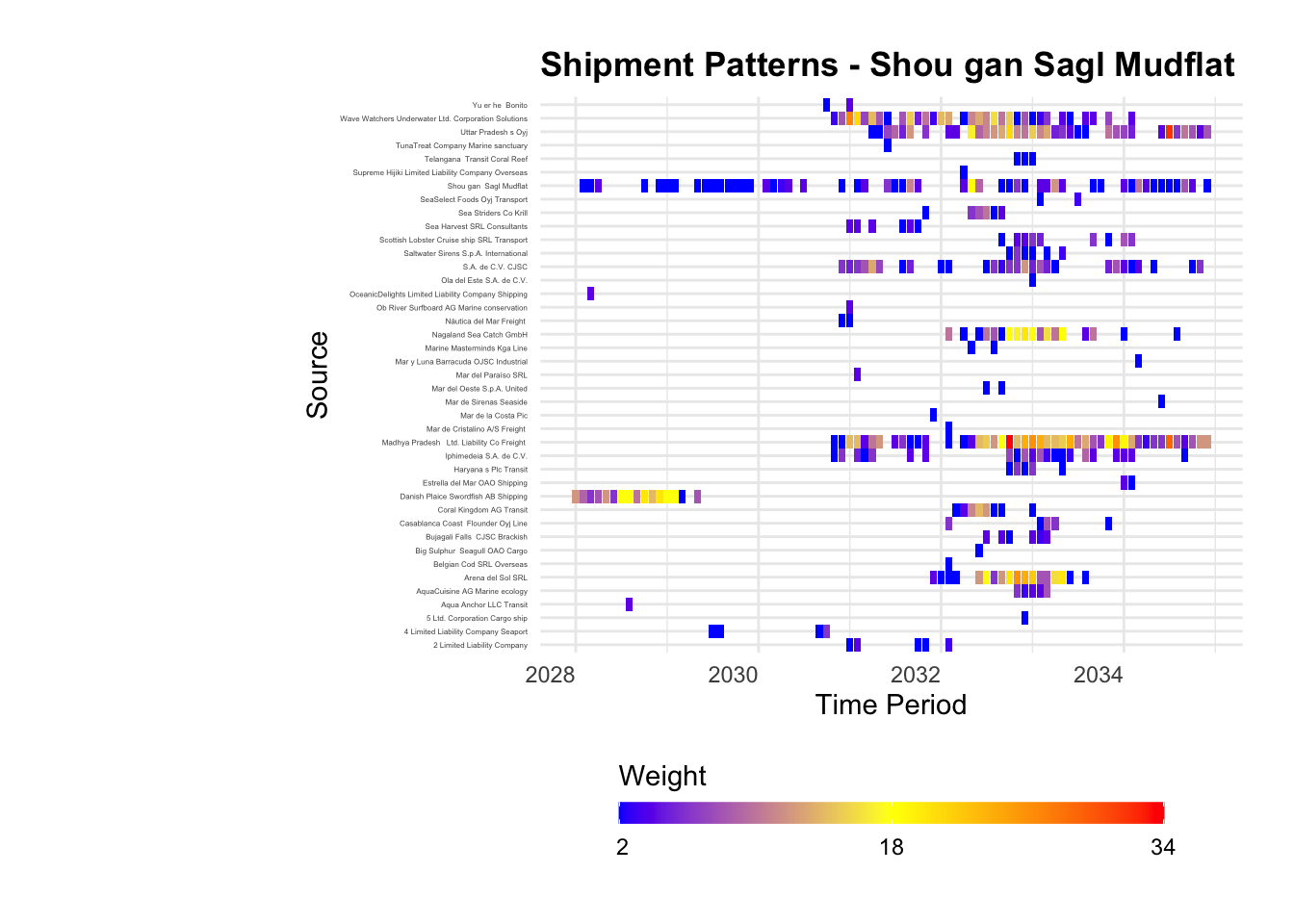
Using a heat map, we can plot out the shipment patterns of ‘Shou gan Sagl Mudflat’ across the 6 years of data. The following trends were observed:

  • The company started out their business mostly shipping produce between 2028 to 2030. During this period, while they do receive shipments, it is only with a few trading partners e.g. Danish Plaice Swordfish AB Shipping
  • From about the mid 2030s, the company starting receiving shipments from an increased number of companies. The business relationships were a mix of sporadic and constant. It is likely during this period that the company started to record high betweenness score.
Note

It is curious to note quite a handful of transactions across several trading partners being fairly sporadic, or even one-off. To understand if this is a norm within the industry, we will review the trading patterns for the node with the next highest betweenness score; Marine Mates NV Worldwide, for comparison.

Show the Code
# Define custom color palette from blue to yellow
my_palette <- c("#0000FF", "#FFFF00", "#FF0000")  # Example colors

# Custom formatting function for legend labels
format_labels <- function(x) {
  format(round(x), nsmall = 0)
}

# Plot heatmap with custom color palette
ggplot(topedge_ym_agg, aes(x = yearmonth, y = from, fill = weight)) +
  geom_tile() +
  labs(x = "Time Period", y = "Source", fill = "Weight") +
  scale_fill_gradientn(colors = my_palette, limits = range(topedge_ym_agg$weight),
                       breaks = seq(min(topedge_ym_agg$weight), max(topedge_ym_agg$weight), length.out = length(my_palette)),
                       labels = format_labels,
                       guide = guide_colorbar(title.position = "top")) +
  theme_minimal() +
  theme(axis.text.x = element_text(angle = 0, hjust = 1),
        axis.text.y = element_text(size = 3),
        plot.margin = margin(20, 20, 20, 120),
        legend.position = "bottom",
        legend.key.height = unit(0.3, "cm"),
        legend.key.width = unit(1.5,"cm"),
        plot.title = element_text(face = "bold")) +
  ggtitle("Shipment Patterns - Shou gan Sagl Mudflat")

4.3 Business Patterns of Node with Highest Betweenness - Marine Mates NV Worldwide

Since we did not create a data frame for Marine Mates NV Worldwide earlier, the following code chunk will do so.

Show the Code
# Filter rows based on company names in 'from' or 'to' column for Marine Mates NV Worldwide
marine_edge_ym <- MC2_edges_fishing %>%
  filter(source == "Marine Mates NV Worldwide" | target == "Marine Mates NV Worldwide")

#Aggregate data
marine_edge_ym_agg <- marine_edge_ym %>%
  group_by(source, target, yearmonth) %>%
  summarise(weight = n(), sumweightkg = sum(weightkg), .groups = 'drop') %>%
  filter(source != target) %>%
  filter(weight > 1) %>%
  ungroup() %>%
  mutate(avg_shipmentwt = sumweightkg / weight) %>%
  mutate(year = substr(yearmonth, 1, 4))

# Change variable names
marine_edge_ym_agg <- marine_edge_ym_agg %>%
  rename(from = source, to = target)

# Get unique values from 'source' and 'target' columns
unique_outliers <- unique(c(marine_edge_ym_agg$from, marine_edge_ym_agg$to))

# Filter 'MC2_nodes' based on unique values
marine_node_ym_agg<- MC2_nodes_unique %>%
  filter(id %in% unique_outliers)
Show the Code
# Define custom color palette from blue to yellow
my_palette <- c("#0000FF", "#FFFF00", "#FF0000")  # Example colors

# Custom formatting function for legend labels
format_labels <- function(x) {
  format(round(x), nsmall = 0)
}

# Plot heatmap with custom color palette
ggplot(marine_edge_ym_agg, aes(x = yearmonth, y = from, fill = weight)) +
  geom_tile() +
  labs(x = "Time Period", y = "Source", fill = "Weight") +
  scale_fill_gradientn(colors = my_palette, limits = range(marine_edge_ym_agg$weight),
                       breaks = seq(min(marine_edge_ym_agg$weight), max(marine_edge_ym_agg$weight), length.out = length(my_palette)),
                       labels = format_labels,
                       guide = guide_colorbar(title.position = "top")) +
  theme_minimal() +
  theme(axis.text.x = element_text(angle = 0, hjust = 1),
        axis.text.y = element_text(size = 3),
        plot.margin = margin(20, 20, 20, 120),
        legend.position = "bottom",
        legend.key.height = unit(0.3, "cm"),
        legend.key.width = unit(1.5,"cm"),
        plot.title = element_text(face = "bold")) +
  ggtitle("Shipment Patterns - Marine Mates NV Worldwide")

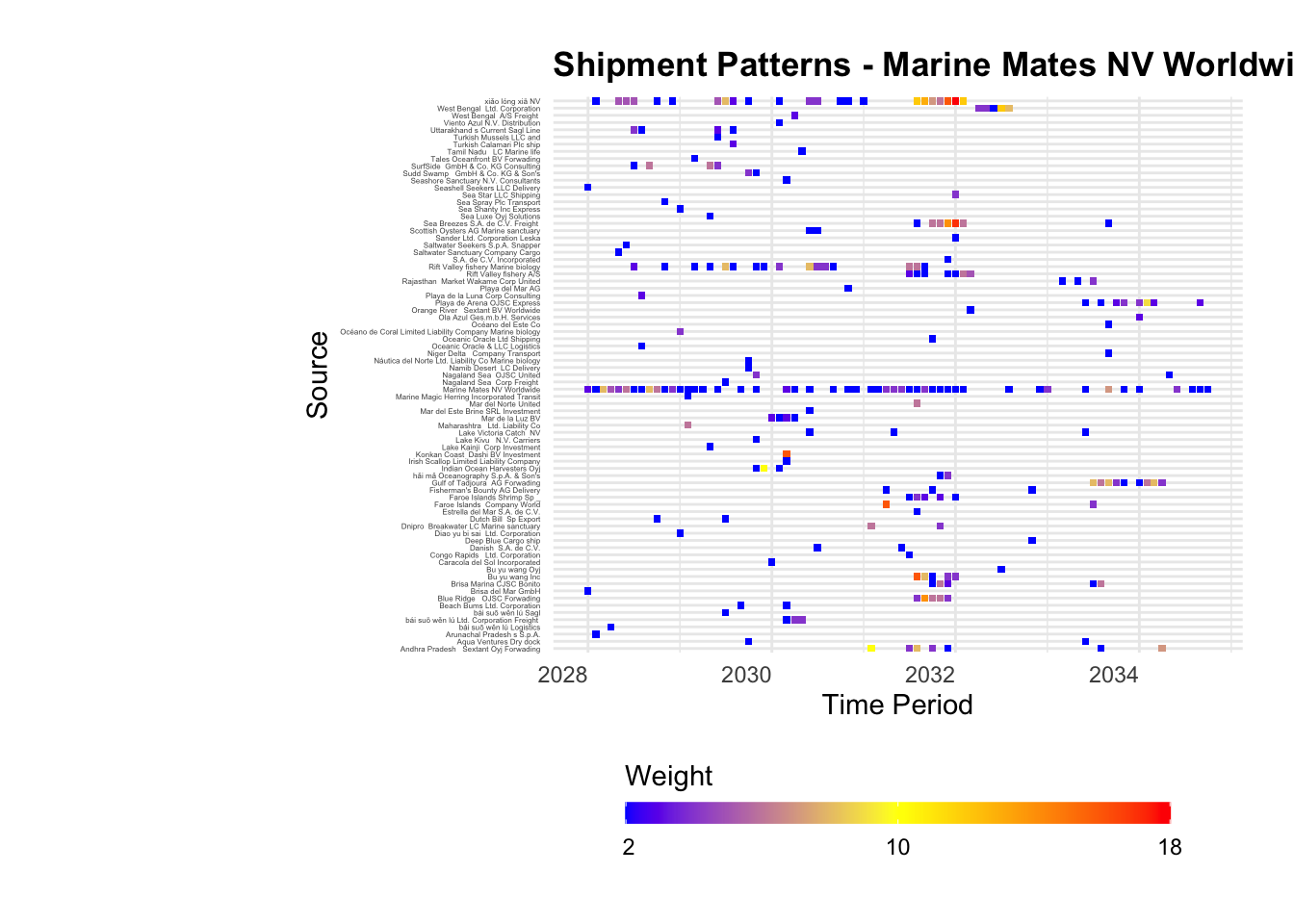
Note

Looking at the heatmap for Marine Mates NV Worldwide, we see that trading patterns are even more sparse compared to Shou gan Sagl Mudflat. This suggests that perhaps, such trading patterns are the norm within the industry.

While it is interesting to review the trading patterns of the individual nodes, insights are fairly limited to help us better understand whether a company is involved in illegal activities. As such, we will expand out lens in subsequent analyses and look at the top 4 nodes.

4.4 Network Graph - Top 4 Betweenness Nodes

As hypothesized, the network graph with the top 4 nodes indeed looks more interesting. Specifically, we can see 4 prominent clusters of nodes. But more interestingly, we also see a handful of nodes that don’t seems to fit squarely into any specific cluster, but yet at the same time hold strong relationships with its neighbours (represented by the darker edges).

Note

While it is likely too prematurely to make a call, but these ‘in-between’ nodes may be useful data points to study. Perhaps, they could represent illegal fishing companies that trade between several large communities.

To study this, we will look at the in and out degree of these nodes.

Show the Code
visNetwork(
  nodes = top4_nodes_ym_agg,
  edges = top4_edge_ym_agg,
  main = "Network Graph of Top 4 Betweenness Nodes"
) %>%
  visIgraphLayout(layout = "layout_with_fr") %>%
  visOptions(
    highlightNearest = TRUE,
    nodesIdSelection = TRUE
  ) %>%
  visEdges(
    arrows = "to",
    smooth = list(enabled = TRUE, type = "curvedCW"),
    color = list(
      inherit = FALSE,
      color = top4_edge_ym_agg$weight,
      opacity = 0.2
    )
  ) %>%
  visLegend() %>%
  visLayout(randomSeed = 123)

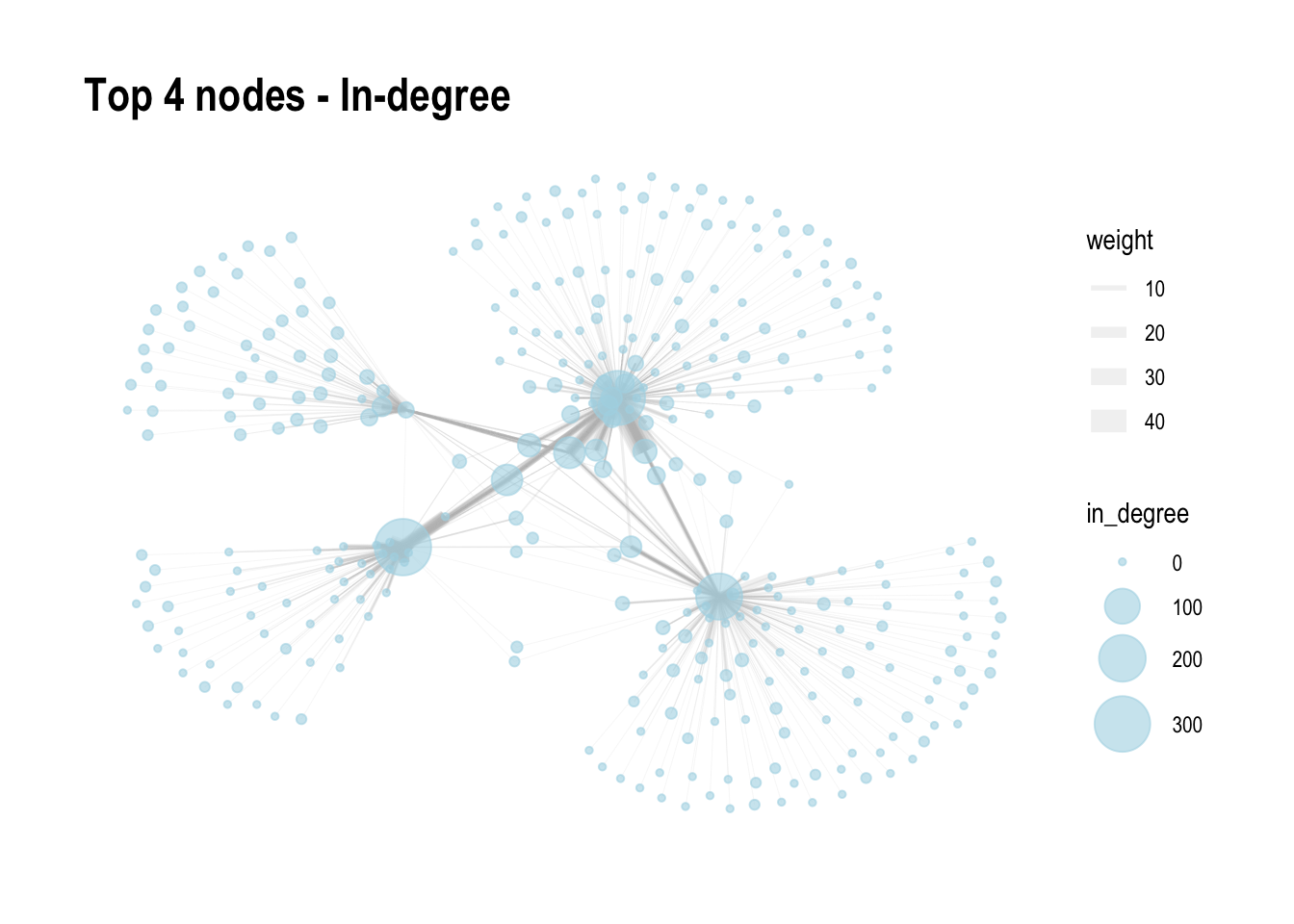
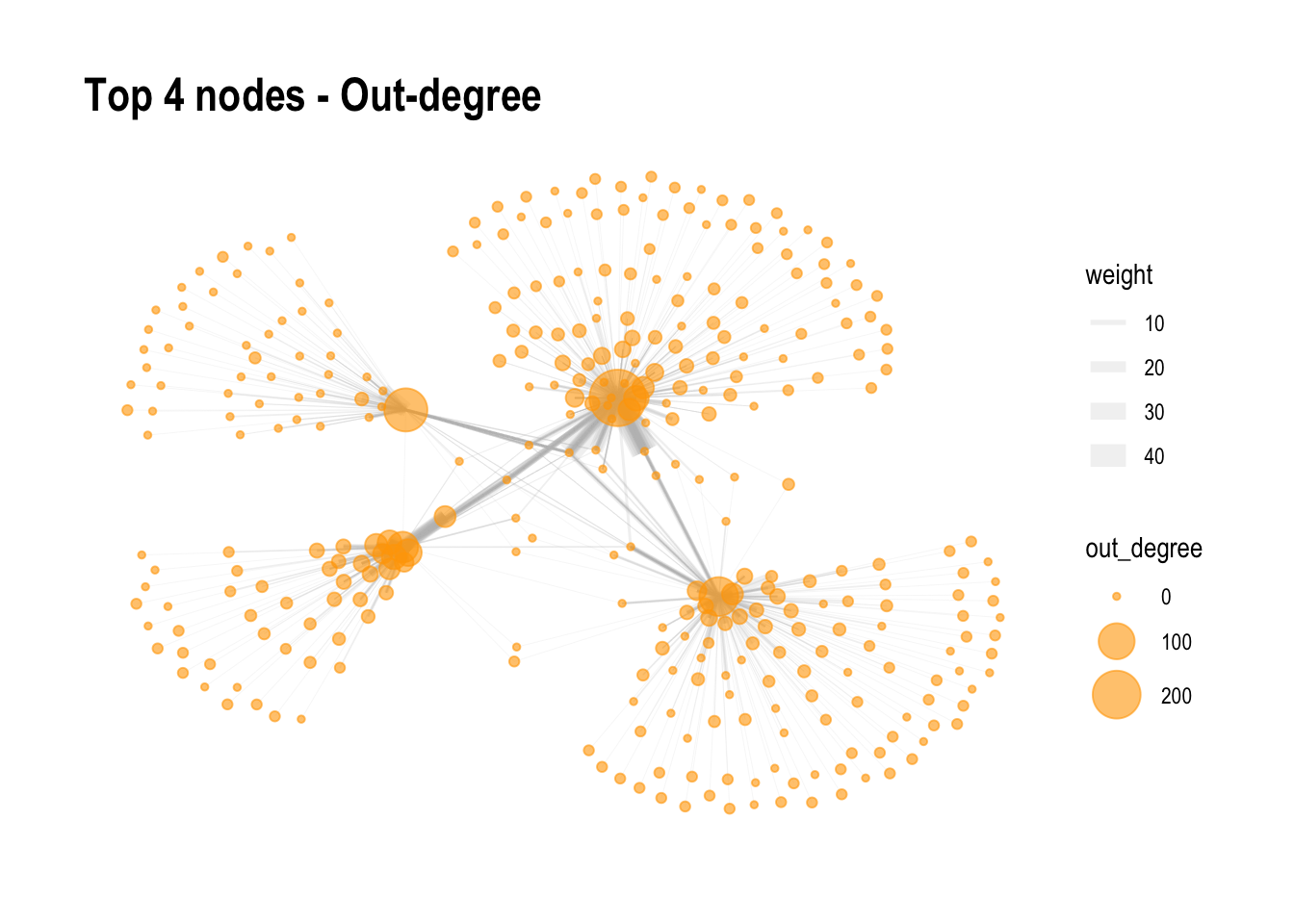
4.5 Network Graph - In and Out Degree

If the nodes ‘floating’ between the 4 large clusters were indeed provider of goods, they will likely register high out degree, and low in degree i.e., they should not be purchasers of produce. However, looking the network graphs below, these nodes tended to have higher in degrees versus out degrees.

This suggests that there are businesses who buys products, and likely across clusters. Unfortunately, these nodes seems unlikely to be contributing to illegal fishing.

Show the Code
set.seed(1234)

top4_graph <- tbl_graph(nodes = top4_nodes_ym_agg,
                           edges = top4_edge_ym_agg, 
                           directed = TRUE)

# Calculate in-degree values
top4_graph <- top4_graph %>%
  activate(nodes) %>%
  mutate(in_degree = centrality_degree(mode = "in"))

# Plot the graph by in degree
g <- ggraph(top4_graph, layout = 'fr') +
  scale_edge_width(range = c(0.1, 5)) +
  geom_edge_link(aes(width = weight), color = "grey", alpha = 0.2) +
  geom_node_point(aes(size = in_degree), color = "lightblue", alpha = 0.6) +
  scale_size(range = c(1, 10)) +
  theme_graph() +
  ggtitle("Top 4 nodes - In-degree")

g

Show the Code
set.seed(1234)

# Calculate out-degree values
top4_graph <- top4_graph %>%
  activate(nodes) %>%
  mutate(out_degree = centrality_degree(mode = "out"))

# Plot the graph by in degree
g <- ggraph(top4_graph, layout = 'fr') +
  scale_edge_width(range = c(0.1, 5)) +
  geom_edge_link(aes(width = weight), color = "grey", alpha = 0.2) +
  geom_node_point(aes(size = out_degree), color = "orange", alpha = 0.6) +
  scale_size(range = c(1, 10)) +
  theme_graph() +
  ggtitle("Top 4 nodes - Out-degree")

g

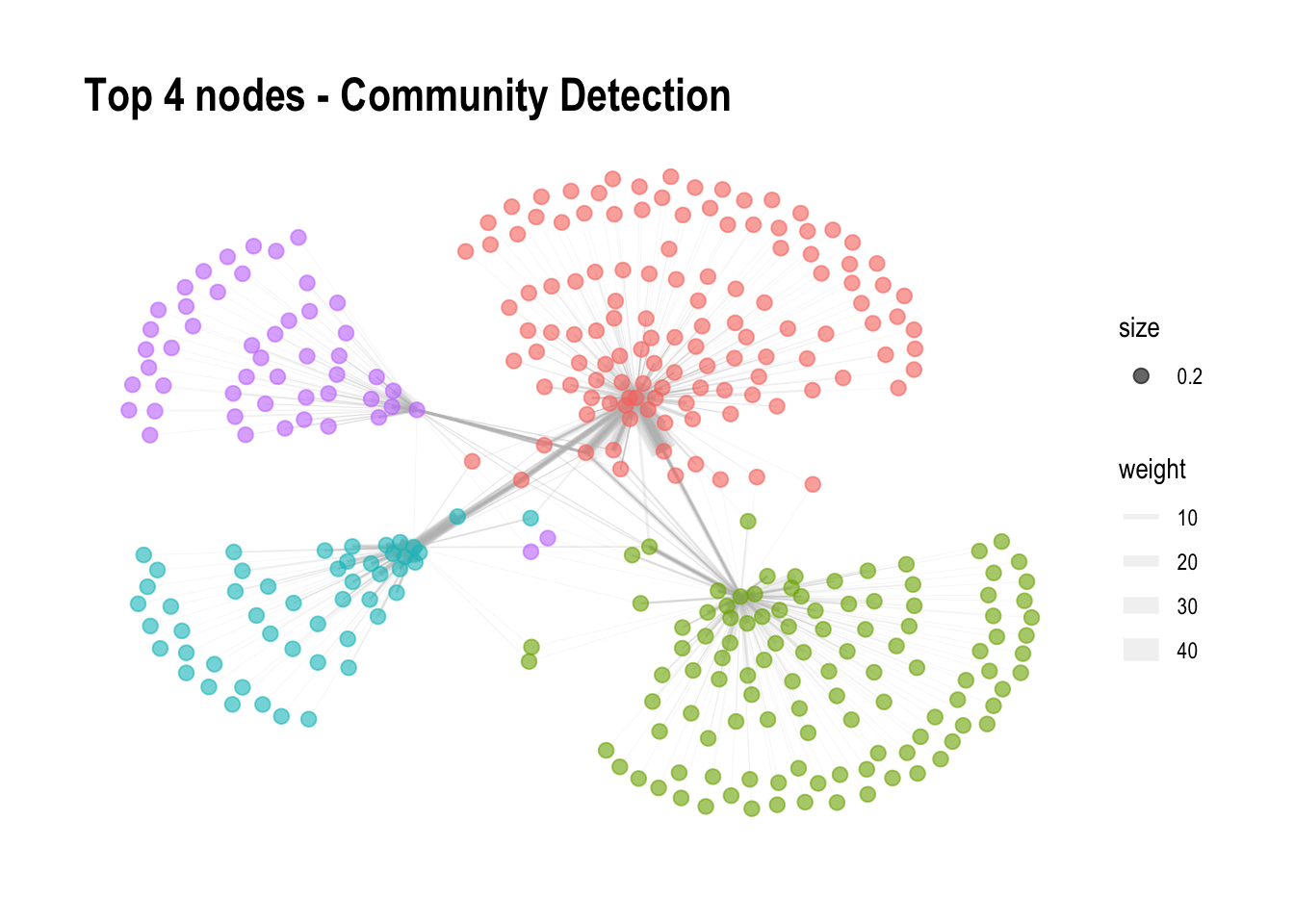
4.4 Network Graph - Network Community

In order to detect communities in our network, the igraph library is used. As we has a directed graph, cluster_walktrap() function is used to perform community detection using the Walktrap algorithm.

Since our data focuses on 4 key nodes, it was unsurprising that 4 clusters appeared. It was also noted that the ‘in-between’ nodes were also clustered accordingly. Nodes with higher betweenness tended to ‘absorb’ more of these ‘in-between’ nodes.

Show the Code
set.seed(1234)

# Convert tbl_graph to igraph object
top4_igraph <- as.igraph(top4_graph)

# Perform community detection using Walktrap
top4_communities <- cluster_walktrap(top4_igraph)

# Add community information to the graph nodes
top4_graph <- top4_graph %>%
  activate(nodes) %>%
  mutate(community = membership(top4_communities))

# Plot the graph with community colors
g <- ggraph(top4_graph, layout = 'fr') +
  scale_edge_width(range = c(0.1, 5)) +
  geom_edge_link(aes(width = weight), color = "grey", alpha = 0.2) +
  geom_node_point(aes(size = 0.2, color = as.factor(community)), alpha = 0.6) +
  scale_size(range = c(1, 3)) +
  scale_color_discrete(guide = FALSE) +
  theme_graph() +
  ggtitle("Top 4 nodes - Community Detection")

g

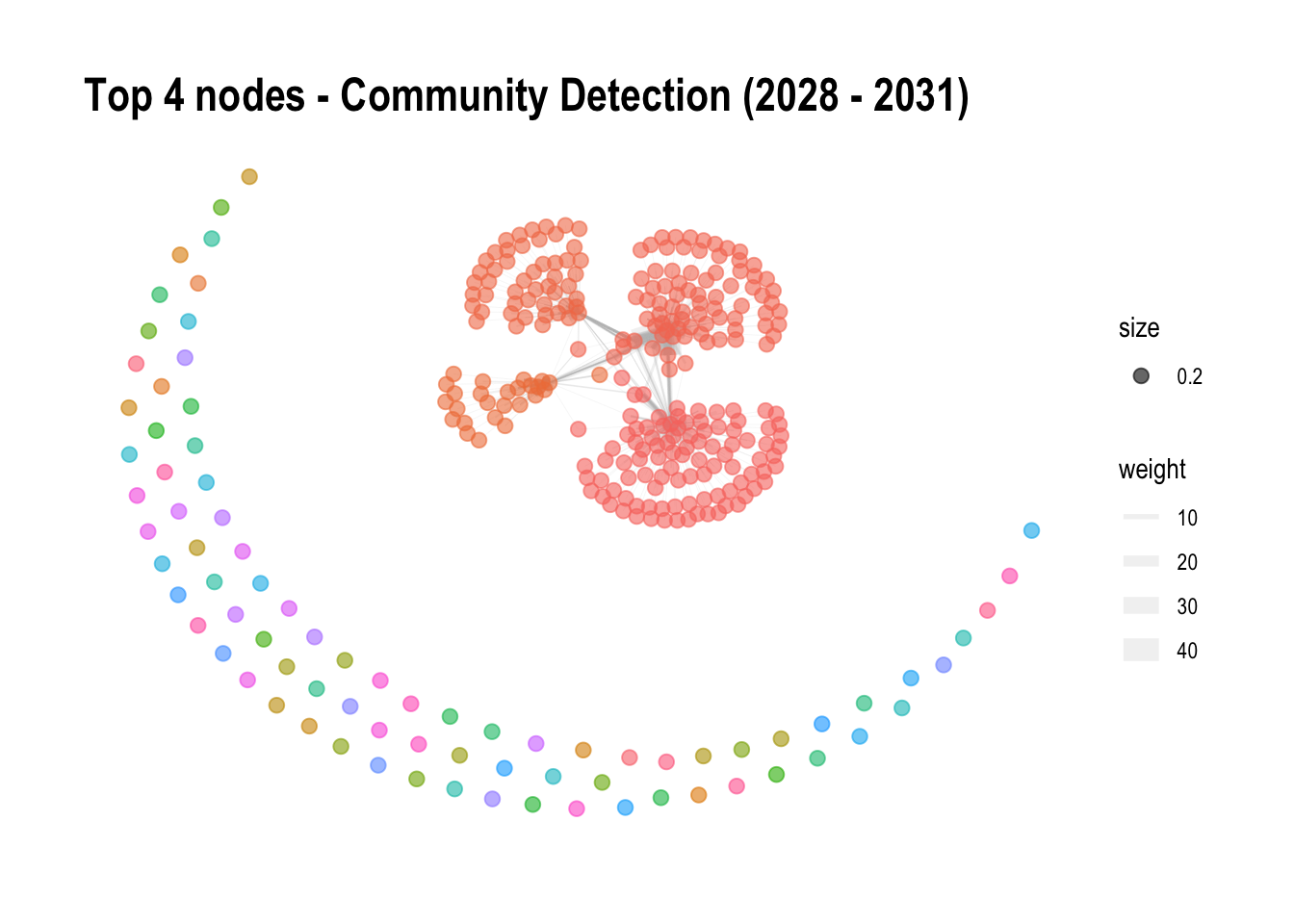
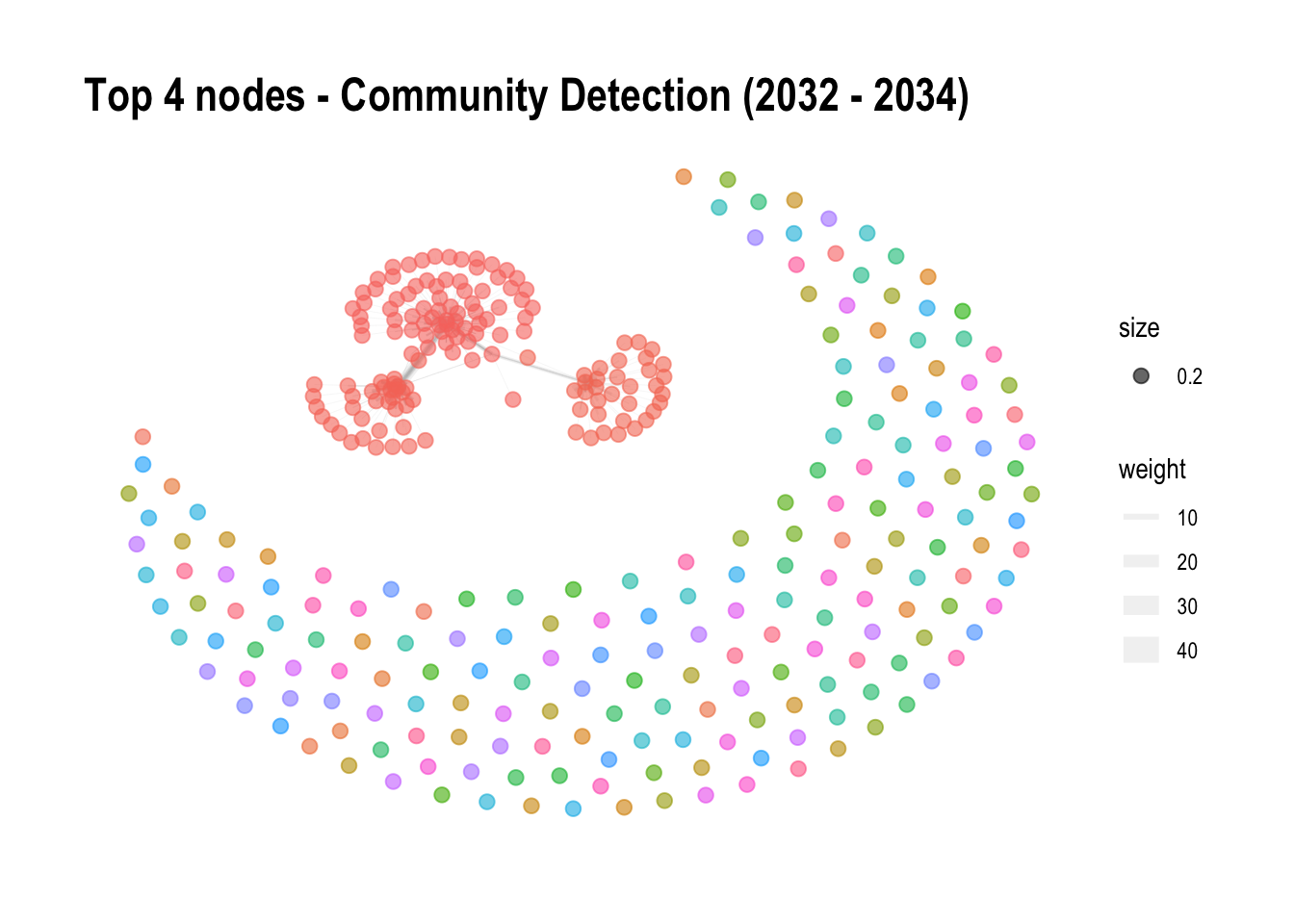
To understand if these top nodes, and its respective communities have shifted overtime, we will divide the nodes and edges into two time frames; the first group from 2028 to 2031, and second group from 2031 to 2034.

Looking at both charts, a few important observations were noted:

  • Looking at the two charts, we see that less nodes were involved in the trading of goods in the later years. This could suggest a trend of smaller players being outplayed by the bigger boys and forced out of the industry.
  • While the first chart churned out 4 communities, aligned with the overall chart above, we see that the chart representing the last 3 years of the data only identified 3 clusters. This means that there are 3 main players, instead of 4 during this period, among the nodes with high betweenness. It is unclear however, if the 4th nodes has merged with another cluster, or was it just sidelined over the years.
Note

There may be value in tracking the communities, and its respective nodes over the years, to take a look at this trend. To understand shifting communities, and underlying reasons behind these shifts.

Show the Code
set.seed(1234)

# Filter the data by year
filtered_graph <- top4_graph %>%
  activate(edges) %>%
  filter(year %in% c(2028, 2029, 2030, 2031))

# Convert tbl_graph to igraph object
filtered_igraph <- as.igraph(filtered_graph)

# Perform community detection using Walktrap
filtered_communities <- cluster_walktrap(filtered_igraph)

# Add community information to the graph nodes
filtered_graph <- filtered_graph %>%
  activate(nodes) %>%
  mutate(community = membership(filtered_communities))

# Plot the filtered graph with community colors
g <- ggraph(filtered_graph, layout = 'fr') +
  scale_edge_width(range = c(0.1, 5)) +
  geom_edge_link(aes(width = weight), color = "grey", alpha = 0.2) +
  geom_node_point(aes(size = 0.2, color = as.factor(community)), alpha = 0.6) +
  scale_size(range = c(1, 3)) +
  scale_color_discrete(guide = FALSE) +
  theme_graph() +
  ggtitle("Top 4 nodes - Community Detection (2028 - 2031)")

g

Show the Code
set.seed(1234)

# Filter the data by year
filtered_graph <- top4_graph %>%
  activate(edges) %>%
  filter(year %in% c(2032, 2033, 2034))

# Convert tbl_graph to igraph object
filtered_igraph <- as.igraph(filtered_graph)

# Perform community detection using Walktrap
filtered_communities <- cluster_walktrap(filtered_igraph)

# Add community information to the graph nodes
filtered_graph <- filtered_graph %>%
  activate(nodes) %>%
  mutate(community = membership(filtered_communities))

# Plot the filtered graph with community colors
g <- ggraph(filtered_graph, layout = 'fr') +
  scale_edge_width(range = c(0.1, 5)) +
  geom_edge_link(aes(width = weight), color = "grey", alpha = 0.2) +
  geom_node_point(aes(size = 0.2, color = as.factor(community)), alpha = 0.6) +
  scale_size(range = c(1, 3)) +
  scale_color_discrete(guide = FALSE) +
  theme_graph() +
  ggtitle("Top 4 nodes - Community Detection (2032 - 2034)")

g

5 Conclusion

  • Looking at the overall dataset provided, a sizable proportion of businesses registered very low betweenness, in and out degrees. This suggests that the industry is likely fairly fragmented, making the identification of illegal activities all the more challenging.

  • For the purpose of these exercises, the top 4 nodes with the highest betweenness scores were identified. These scores for these nodes were significantly higher when compared to the average nodes. This suggests that they are likely big players, be it a supplier or purchasers of produce from the industry.

  • Zooming int the top 2 players, it was observed that trading patterns between partners were a mix of stable and sporadic. In fact, a large majority of trading relations were sporadic, some even one-off, and there may be value in looking deeper into the businesses that conduct these more on-off transactions.

  • Looking at the network graph of the top 4 players, we noticed there were a handful of smaller businesses that interact with multiple large nodes, instead of fitting nicely into one cluster. When looking at the in and out-degree of these ‘in-between’ nodes, these nodes tended to have higher in degrees versus out degree, suggesting that there are businesses who buys instead of supply produce. As such, these nodes seem unlikely to be contributing to illegal fishing activites.

  • Lastly, there may be value in tracking the communities, and its respective nodes over the years,to understand the shift in dominance among companies. The rise and perhaps fall of these companies and its related relationships may shed light towards illegal fishing activities.

6 Suggestions for Group Project

  • As part of this exercise, I tried plotting the larger network of the 4 key nodes, i.e., beyond the 4 ego-network, to including additional neighbouring nows. However it crashed my computer. That said, I believe there is value in exploring the peripheral nodes, perhaps be more selective, and identify nodes that are more isolated than others. Specifically, we will look out for nodes that constantly make one-off trade, or tend to have large intervals between them.

  • Currently, this exercise only look at number of shipments and its associated pattern. However, they is also value in looking at other measures such as total weight, or average weight per shipment, to understand if there are odd relationships on that front.

  • Currently, the graphs mapping the communities are static, and does not show the movement of these edges and nodes across time. However, since the static graphs seem to suggest potential significant shifts, there might be value in finding out how we can track these changes, i.e., movement of communities over time. Doing so will help us answer questions like, did a significant node company had to shut down over the years? Who did its business partner shift towards? And why.